Do you have a confidential Excel, Word or PowerPoint file? Here’s how to protect it with a password. Microsoft Office allows you to secure any document with a password.Â
The file is then automatically encrypted and can only be read when the password is provided. We use a Word document here for illustration, but the process is the same for Excel and PowerPoint.
Procedure to follow:
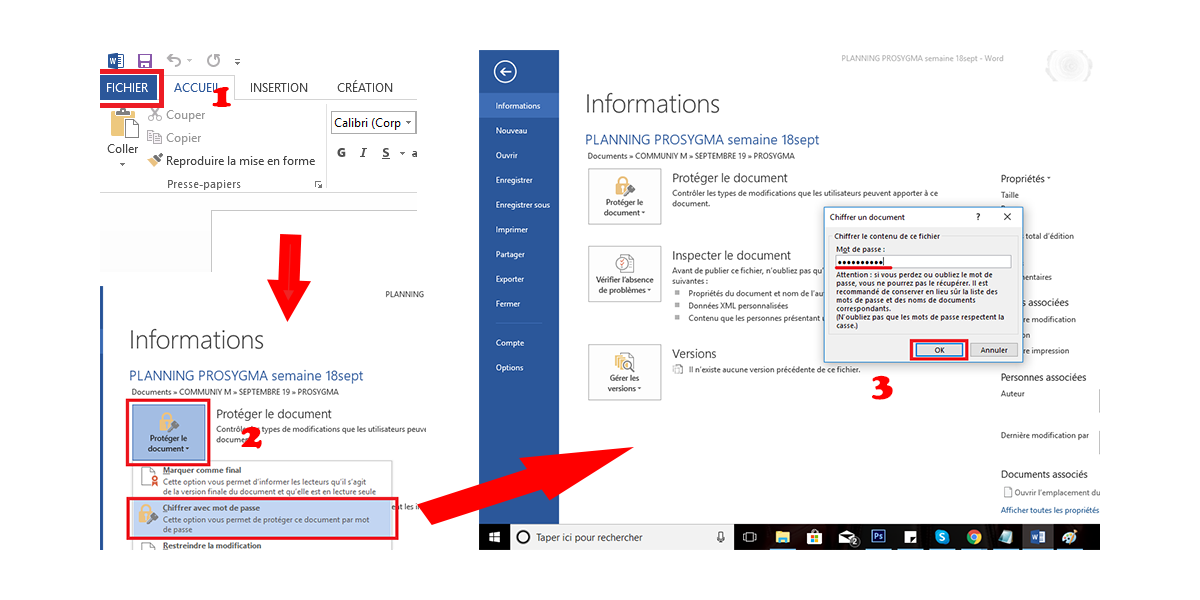
1. Open the Office file you want to protect with a password;
2. Go to File> Info> Protect document. In the drop-down menu that opens, select Encrypt with a password;
3. Enter the password of your choice and confirm;
NB: The next time you open this file, you will be asked for a code without which you would not be able to access the contents of the file.
Translated with www.DeepL.com/Translator
Do you have a confidential Excel, Word or PowerPoint file? Here’s how to protect it with a password. Microsoft Office allows you to secure any document with a password.Â
The file is then automatically encrypted and can only be read when the password is provided. We use a Word document here for illustration, but the process is the same for Excel and PowerPoint.
Procedure to follow:
1. Open the Office file you want to protect with a password;
2. Go to File> Info> Protect document. In the drop-down menu that opens, select Encrypt with a password;
3. Enter the password of your choice and confirm;
NB: The next time you open this file, you will be asked for a code without which you would not be able to access the contents of the file.
Translated with www.DeepL.com/Translator