Adobe Flash Player is a plugin or standalone media player that uses Flash technology. Starting from Chrome 76, Google’s browser blocks Adobe Flash content by default.
However, it is possible to enable flash by default on your Chrome browser to access the content of the website :
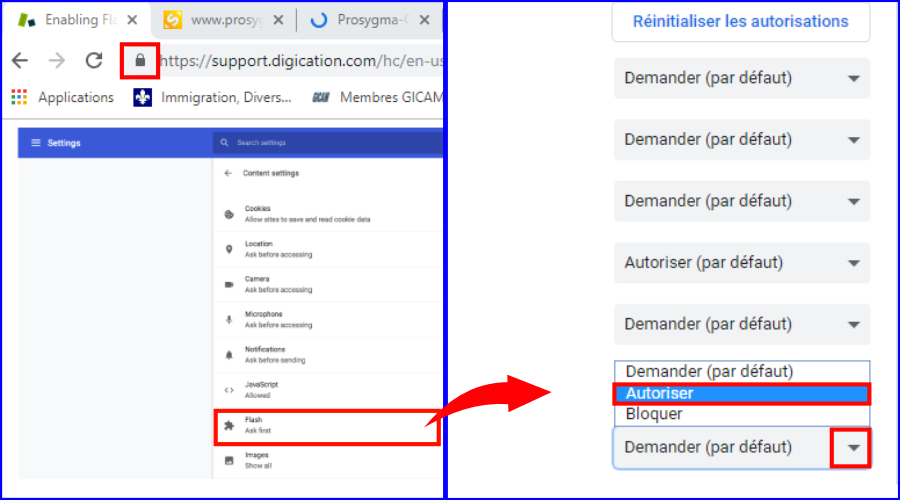
1. Click on the padlock on the left of the address bar
2. Choose Allow from the drop-down list next to Flash
3. Reload the page and Click on the Flash content to load it
NB: Flash Player will no longer be supported after December 2020, it is gradually being replaced by HTML5, webmasters are called upon to adapt their websites and multimedia content as quickly as possible.
Adobe Flash Player is a plugin or standalone media player that uses Flash technology. Starting from Chrome 76, Google’s browser blocks Adobe Flash content by default.
However, it is possible to enable flash by default on your Chrome browser to access the content of the website :
1. Click on the padlock on the left of the address bar
2. Choose Allow from the drop-down list next to Flash
3. Reload the page and Click on the Flash content to load it
NB: Flash Player will no longer be supported after December 2020, it is gradually being replaced by HTML5, webmasters are called upon to adapt their websites and multimedia content as quickly as possible.